Tair had a brainstorm this week: why not use a custom UserControl together with a DataList and an ObjectDataSource? When using a UserControl, we can set one property of the type of our business entity in the control, and in the setter of that property fill the child controls of the UserControl with the needed data.
Just to show that this can be done, I wrote up some stupid code. I'll put it up in a minute at cc.jct.ac.il/~fast/ObjectDataSrcExample.zip. Anyway, here's what I did:
Just as in the past, I have a Manager class and an Info (business entity) class in the BL. The Manager class has a Select() method that returns a strongly-typed List of my Info class.
namespace PizzaPlanet
{
public class PizzaInfo
{
public string Size { get; set; }
public bool Peppers { get; set; }
public bool Olives { get; set; }
public bool Mushrooms { get; set; }
public PizzaInfo AllInfo { get { return this; } }
}
public style PizzaManager
{
public List<PizzaInfo> Select(List<PizzaInfo> SavedList)
{
return SavedList;
}
}
}
Note what's different this time: my Info class has an extra property AllInfo that returns this. Meaning the whole business entity. When you use an ObjectDataSource for databinding, it exposes the properties of every entity in the returned list, but not the entire encapsulated object. So it's convenient to have a property that returns this.
Now, here's the source code for my user control:
public partial class PizzaControl : System.Web.UI.UserControl
{
private PizzaPlanet.PizzaInfo _internalPizza;
public PizzaPlanet.PizzaInfo InternalPizza {
get { return _internalPizza; }
set {
_internalPizza = value;
if (_internalPizza.Size == "Small")
{
imgPizza.Width = 200;
imgPizza.Height = 200;
}
else
{
imgPizza.Width = 400;
imgPizza.Height = 400;
}
if (_internalPizza.Mushrooms)
{
if (_internalPizza.Olives)
{
if (_internalPizza.Peppers)
{
imgPizza.ImageUrl = "~/images/mushroomOlivePepperPizza.png";
}
else
{
imgPizza.ImageUrl = "~/images/mushroomOlivePizza.png";
}
}
else
{
if (_internalPizza.Peppers)
{
imgPizza.ImageUrl = "~/images/mushroomPepperPizza.png";
}
else
{
imgPizza.ImageUrl = "~/images/mushroomPizza.png";
}
}
}
else
{
if (_internalPizza.Olives)
{
if (_internalPizza.Peppers)
{
imgPizza.ImageUrl = "~/images/olivePepperPizza.png";
}
else
{
imgPizza.ImageUrl = "~/images/olivePizza.png";
}
}
else
{
if (_internalPizza.Peppers)
{
imgPizza.ImageUrl = "~/images/pepperPizza.png";
}
else
{
imgPizza.ImageUrl = "~/images/plainPizza.png";
}
}
}
}
}
}
The control itself contains one Image, named imgPizza. All my .cs is doing is setting the toppings and size of the picture when InternalPizza is set.
Now for the actual form:
we have an ObjectDataSource with its TypeName set to my Manager class. The SelectMethod is set to PizzaManager's Select() method.
To make this sample easy to work with, I have the user enter new pizzas, which the order button saves in the Session, and then when the form reloads the ObjectDataSource passes the saved list from the Session to the PizzaManager (note that I disabled ViewState for all my controls).
The visible part of the form is a DataList. The DataList accepts ItemTemplates only (no BoundColumns or other predefined options here). So our ItemTemplate consists of exactly one control: the UserControl we defined.
(For the uninitiated, here's a quick list of what to do:
Add a DataList to your form.
Click on the side-arrow next to the new DataList.
Set the DataSource to your ObjectDataSource.
Click EditTemplates.
Select ItemTemplate.)
Normally, we would set the bound properties of the control contained in the Template via a wizard. When working with a UserControl, though, custom properties don't register in the wizard, so we're going to do this by hand. The InternalPizza property of our PizzaControl needs to be bound to Eval("AllInfo") -- remember, InternalPizza is of type PizzaInfo, and AllInfo returns the entire object. Here's the code from the .aspx:
<asp:DataList ID="DataList1" runat="server" DataSourceID="odsPizza"
EnableViewState="False">
<ItemTemplate>
<uc1:PizzaControl ID="PizzaControl1" runat="server"
InternalPizza='<%# Eval("AllInfo") %>' />
</ItemTemplate>
</asp:DataList>
That just about wraps it up. I think I'll go have lunch...
Showing posts with label 3-layered. Show all posts
Showing posts with label 3-layered. Show all posts
01 September 2009


09 July 2009
|DataDirectory| distress
The issue first came up in a project last semester, and again it haunts us:
when you place your .mdf file in one project (the DAL) and execute the application from another project (the UI) evil things happen. Namely, you get an exception:
System.Data.SqlClient.SqlException was unhandled by user code
Message="An attempt to attach an auto-named database for file blah blah blah\PL\myDB.mdf failed. A database with the same name exists, or specified file cannot be opened, or it is located on UNC share."
As I say, this is evil. The file myDB.mdf is right where I put it; when I go into Settings for my DAL project and open the nifty dialog box for my connection string, the "Test Connection" button works just fine.
But just you take a closer look at that error. When I compile my application, the system starts looking for my DB in the directory that contains my PL, not my DAL. What happened?
When I open the nifty dialog box, the path for my DB looks like this:
blah blah blah\DAL\myDB.mdf
The actual value of the setting in my DAL\Settings.settings file looks like this:
Data Source=.\SQLEXPRESS;AttachDbFilename=|DataDirectory|\myDB.mdf;Integrated Security=True;Connect Timeout=30;User Instance=True
Ha ha! Foul play! I can spend the whole day setting the location of the DB in the nifty dialog box, but in the bitter end the Settings.settings file translates the path of the parent project to a variable called |DataDirectory|, and at compile time it replaces my DAL project's path with the startup (UI) project's path for the value of that variable.
What's the right workaround?
1. The wrongheaded way would be to elbow my way into the Settings.settings and set the path absolutely to the location of my DB. Wrongheaded, because if I move my project around (even on my own machine), I have to elbow back in and update the location.
2. The easy way out would be to use SQL Server instead of a local data file. Which is of course what we're doing on our project.
3. I thought to try to place the DB in the parent folder of the projects - ie, in the solution folder. But that induced Settings.settings to hard-code the location. Not much better than solution 1.
4. Finally I found what I was looking for! by jumping from here to here to (at last!)
https://blogs.msdn.com/smartclientdata/archive/2005/08/26/456886.aspx
So I added the following line of code to a function that is executed before I try to access my data:
"AppDomain.CurrentDomain.SetData("DataDirectory", AppDomain.CurrentDomain.BaseDirectory.Replace("GUI", "DAL") );"
where GUI is the directory of my UI and DAL is the directory of my DAL and they are in the same parent (solution) directory.
But really DBs were meant to be on servers, and anyway 3 layers are 2 layers too many. So claims Microsoft.
Now considering how much trouble this has caused a good number of people since 2005, I think it's time for Microsoft to rethink its nifty features.
when you place your .mdf file in one project (the DAL) and execute the application from another project (the UI) evil things happen. Namely, you get an exception:
System.Data.SqlClient.SqlException was unhandled by user code
Message="An attempt to attach an auto-named database for file blah blah blah\PL\myDB.mdf failed. A database with the same name exists, or specified file cannot be opened, or it is located on UNC share."
As I say, this is evil. The file myDB.mdf is right where I put it; when I go into Settings for my DAL project and open the nifty dialog box for my connection string, the "Test Connection" button works just fine.
But just you take a closer look at that error. When I compile my application, the system starts looking for my DB in the directory that contains my PL, not my DAL. What happened?
When I open the nifty dialog box, the path for my DB looks like this:
blah blah blah\DAL\myDB.mdf
The actual value of the setting in my DAL\Settings.settings file looks like this:
Data Source=.\SQLEXPRESS;AttachDbFilename=|DataDirectory|\myDB.mdf;Integrated Security=True;Connect Timeout=30;User Instance=True
Ha ha! Foul play! I can spend the whole day setting the location of the DB in the nifty dialog box, but in the bitter end the Settings.settings file translates the path of the parent project to a variable called |DataDirectory|, and at compile time it replaces my DAL project's path with the startup (UI) project's path for the value of that variable.
What's the right workaround?
1. The wrongheaded way would be to elbow my way into the Settings.settings and set the path absolutely to the location of my DB. Wrongheaded, because if I move my project around (even on my own machine), I have to elbow back in and update the location.
2. The easy way out would be to use SQL Server instead of a local data file. Which is of course what we're doing on our project.
3. I thought to try to place the DB in the parent folder of the projects - ie, in the solution folder. But that induced Settings.settings to hard-code the location. Not much better than solution 1.
4. Finally I found what I was looking for! by jumping from here to here to (at last!)
https://blogs.msdn.com/smartclientdata/archive/2005/08/26/456886.aspx
So I added the following line of code to a function that is executed before I try to access my data:
"AppDomain.CurrentDomain.SetData("DataDirectory", AppDomain.CurrentDomain.BaseDirectory.Replace("GUI", "DAL") );"
where GUI is the directory of my UI and DAL is the directory of my DAL and they are in the same parent (solution) directory.
But really DBs were meant to be on servers, and anyway 3 layers are 2 layers too many. So claims Microsoft.
Now considering how much trouble this has caused a good number of people since 2005, I think it's time for Microsoft to rethink its nifty features.
02 July 2009
Pile on the layers
Here's a quote from MSDN:
"Most ASP.NET data source controls, such as the SqlDataSource, are used in a two-tier application architecture where the presentation layer (the ASP.NET Web page) communicates directly with the data tier (the database, an XML file, and so on)."
This is a cute way of saying that all those nice data-bound ASP.net controls - the ones that are supposed to take a data source and then do all the work of Selecting, Inserting, Updating, and Deleting (ie, CRUD) for you - will not work in a 3-layered structure.
That was the bad news, except that we knew it all along.
Here comes the good news:
"The ObjectDataSource works with a middle-tier business object to select, insert, update, delete, page, sort, cache, and filter data declaratively without extensive code."
http://msdn.microsoft.com/en-us/library/9a4kyhcx.aspx
So what do we need to do in order to get the data-sourced controls to work with an ObjectDataSource and, by extension, a BL and DAL?
Creating an ObjectDataSource Control Source Object has some answers. We need to define a stateless class (no non-static members) to provide CRUD logic for the data to populate the data-bound control on our form. Optionally, this class can also provide functions to filter the data and sort it. Then, using the (very handy) wizard provided by the ObjectDataSource, we select the class with the CRUD functions and identify the parameters it needs to preform Select.
Very well, but what about the parameters for Insert, Update, and Delete?
We can define another class to represent a record/row in our data schema. (The TypeName property of the ObjectDataSource must be set to this class.) All properties of the class will be polled (by reflection, one presumes) in order to fill the data-sourced control, and will be filled in return for the Update function. By setting the ConflictDetection property of the ObjectDataSource, we can even decide how updates should be done:
OverwriteChanges will simply fill an object with the new values and pass it to the Update function.
CompareAllValues will fill two objects: the first with the old values, the second with the new, and pass both to the Update function.
Two items of note:
1. The wizard will only work if your latest working build contains all the classes and functions you want to use! In other words, Build your project before running the wizard.
2. The CRUD functions I'm describing here are in my BL. They themselves do NOT do the actual persistence to the DB; rather they massage the data as appropriate and pass it in the appropriate format to the DAL, which does the real work.
"Most ASP.NET data source controls, such as the SqlDataSource, are used in a two-tier application architecture where the presentation layer (the ASP.NET Web page) communicates directly with the data tier (the database, an XML file, and so on)."
This is a cute way of saying that all those nice data-bound ASP.net controls - the ones that are supposed to take a data source and then do all the work of Selecting, Inserting, Updating, and Deleting (ie, CRUD) for you - will not work in a 3-layered structure.
That was the bad news, except that we knew it all along.
Here comes the good news:
"The ObjectDataSource works with a middle-tier business object to select, insert, update, delete, page, sort, cache, and filter data declaratively without extensive code."
http://msdn.microsoft.com/en-us/library/9a4kyhcx.aspx
So what do we need to do in order to get the data-sourced controls to work with an ObjectDataSource and, by extension, a BL and DAL?
Creating an ObjectDataSource Control Source Object has some answers. We need to define a stateless class (no non-static members) to provide CRUD logic for the data to populate the data-bound control on our form. Optionally, this class can also provide functions to filter the data and sort it. Then, using the (very handy) wizard provided by the ObjectDataSource, we select the class with the CRUD functions and identify the parameters it needs to preform Select.
Very well, but what about the parameters for Insert, Update, and Delete?
We can define another class to represent a record/row in our data schema. (The TypeName property of the ObjectDataSource must be set to this class.) All properties of the class will be polled (by reflection, one presumes) in order to fill the data-sourced control, and will be filled in return for the Update function. By setting the ConflictDetection property of the ObjectDataSource, we can even decide how updates should be done:
OverwriteChanges will simply fill an object with the new values and pass it to the Update function.
CompareAllValues will fill two objects: the first with the old values, the second with the new, and pass both to the Update function.
Two items of note:
1. The wizard will only work if your latest working build contains all the classes and functions you want to use! In other words, Build your project before running the wizard.
2. The CRUD functions I'm describing here are in my BL. They themselves do NOT do the actual persistence to the DB; rather they massage the data as appropriate and pass it in the appropriate format to the DAL, which does the real work.
30 June 2009
Dude, where's my data access?
בהעמקת הכרותנו עם שכבת הממשק משתמש, אפשר כבר לראות את הצל של שכבת הלוגיקה המתקרבת. הגיע הזמן לקצת תכנון.
הנושא של היום הוא השאלה איפה לשים את הקוד שמפיק את שאילתותנו מול מסד הנתונים. החלטנו בשלב מוקדם יותר (ראה להלן) להשתמש ב
Linq to SQL
לשכבת ה
DAL.
 LINQ to SQL,
כשגוררים עליו טבלאות ממסד נתונים של
SQL Server,
אוטומטית קורא ומפיק את היחסים בין הטבלאות שהגדרת במסד הנתונים
 כששומרים את הקובץ
Linq to SQL,
מופק אוטומטית מחלקה בשם
DataContext - הקשר-נתונים
ביחד עם כל המחלקות שצריך כדי להציג את הישויות שלך כאובייקטים, כולל יכולות שמירה וקריאה למסד הנתונים.
המחלקות שאנחנו תכלי'ס כתבנו בשכבת ה
DAL
מבצעות את הלוגיקה הכי בסיסית של
CRUD (create, retrieve, update, and delete)
על כל סוג של ישות בנפרד. אציין שככה לא צריך אף פעם לגזור מחרוזת
SQL.
ואם בנינו נכון את היחסים, אף פעם לא צריך לבנות שאילתת
Linq
שמשמתמש ב
join.
המחלקות שיצר לנו את מחלקת ההקשר-נתונים אמורים לעשות לנו את כל העבודה.
היופי בזה הוא בכך שאם יש לי ביד ישות "בנאדם" או אוסף שלהן, כל עוד שהוא מקושר למחלקת ההקשר-נתונים (ז"א, לא עבר תהליך סריליזציה - נושא לכניסה אחרת) אפשר "למשוך" על מספרי הטלפון של הבנאדם (עם זו פעם הראשונה למופע הזה, לפחות) ואז הוא יבצע שאילתא מול מסד הנתונים ויוציא את המידע הצריך.
והינה השאלה של היום: כמה מהמשיכה הזו נכון לעשות בשכבת הלוגיקה?
פרט זה, של מתי מתבצע השאילתא, זה לא ענין, אלא איזה קוד אחראי על ביצועו. לכן אם קוד מופק אוטומטית של הקשר-נתונים נמצא בשכבת ה
DAL
וקיימת שורה בשכבת הלוגיקה שגורמת לו להתבצע, האם שברנו אף חוק של תכנות ב3 שכבות? נדמה לי שלא. ואם נחליט בתאריך מאוחר יותר להשתמש בטכנולוגיה אחרת בשכבת ה
DAL,
נוכל לספק מחלקות שמחשפות אובייקטים מיוחסים כמו אלה של
Linq to SQL.
ושכבת הלוגיקה לא צריכה אף פעם לדאוג מתי נקרא המידע ממסד הנתונים.
-------------------------------------------------
As we dig deeper into the UI layer, the ghostlike form of the Business Logic layer (BL) is peering out at us from the future. A little planning is in order.
Today's issue is the question of where to place the code that generates our queries on the DB. We decided at an early stage (see below) to use LINQ to SQL for our Data Access layer (DAL).
LINQ to SQL, when you drag tables from an SQL Server database onto it, automatically reads and generates the existing relationships between your tables.
When you then save your LINQ to SQL class, called a DataContext, it autogenerates a code file with all the classes necessary to
1) represent your data entities in your program as business entities
2) persist your entities to the database
The classes we wrote for the DAL do the very barest CRUD logic (create, retrieve, update, and delete) on one entity type at a time. Note that with LINQ to SQL, we need not ever write a single SQL string. If we built the relationships correctly, furthermore, we need not ever write a single LINQ query with a "join" - because the DataContext should be doing that all for us.
The beauty of LINQ is that once I have a Person or collection of Persons, as long as it is still attached to the generating DataContext (that means it has never been serialized and deserialized... a topic for a different post), I can pull on Person.Phones and that will (the first time I call it for this instance) query the database for the phone objects related to the person at hand.
And so, the question: how much of this pulling can responsibly be done in the BL?
The detail of when the query is executed is not an issue, it's only a question of which code is reponsible for doing it. So if the autogenerated code for the DataContext is in the DAL, and a line in the BL causes it to fire and query the DB, have we violated any priciple of 3-layered structure? I don't think we have. And if we decide at some later date to use LINQ to Entities or some other mechanism in our DAL, we can provide classes that expose the related objects just as well as LINQ to SQL does. And the BL need never worry about when the data is read from the DB.
הנושא של היום הוא השאלה איפה לשים את הקוד שמפיק את שאילתותנו מול מסד הנתונים. החלטנו בשלב מוקדם יותר (ראה להלן) להשתמש ב
Linq to SQL
לשכבת ה
DAL.
 LINQ to SQL,
 כשגוררים עליו טבלאות ממסד נתונים של
SQL Server,
אוטומטית קורא ומפיק את היחסים בין הטבלאות שהגדרת במסד הנתונים
 כששומרים את הקובץ
Linq to SQL,
מופק אוטומטית מחלקה בשם
DataContext - הקשר-נתונים
ביחד עם כל המחלקות שצריך כדי להציג את הישויות שלך כאובייקטים, כולל יכולות שמירה וקריאה למסד הנתונים.
המחלקות שאנחנו תכלי'ס כתבנו בשכבת ה
DAL
מבצעות את הלוגיקה הכי בסיסית של
CRUD (create, retrieve, update, and delete)
על כל סוג של ישות בנפרד. אציין שככה לא צריך אף פעם לגזור מחרוזת
SQL.
ואם בנינו נכון את היחסים, אף פעם לא צריך לבנות שאילתת
Linq
שמשמתמש ב
join.
המחלקות שיצר לנו את מחלקת ההקשר-נתונים אמורים לעשות לנו את כל העבודה.
היופי בזה הוא בכך שאם יש לי ביד ישות "בנאדם" או אוסף שלהן, כל עוד שהוא מקושר למחלקת ההקשר-נתונים (ז"א, לא עבר תהליך סריליזציה - נושא לכניסה אחרת) אפשר "למשוך" על מספרי הטלפון של הבנאדם (עם זו פעם הראשונה למופע הזה, לפחות) ואז הוא יבצע שאילתא מול מסד הנתונים ויוציא את המידע הצריך.
והינה השאלה של היום: כמה מהמשיכה הזו נכון לעשות בשכבת הלוגיקה?
פרט זה, של מתי מתבצע השאילתא, זה לא ענין, אלא איזה קוד אחראי על ביצועו. לכן אם קוד מופק אוטומטית של הקשר-נתונים נמצא בשכבת ה
DAL
וקיימת שורה בשכבת הלוגיקה שגורמת לו להתבצע, האם שברנו אף חוק של תכנות ב3 שכבות? נדמה לי שלא. ואם נחליט בתאריך מאוחר יותר להשתמש בטכנולוגיה אחרת בשכבת ה
DAL,
נוכל לספק מחלקות שמחשפות אובייקטים מיוחסים כמו אלה של
Linq to SQL.
ושכבת הלוגיקה לא צריכה אף פעם לדאוג מתי נקרא המידע ממסד הנתונים.
-------------------------------------------------
As we dig deeper into the UI layer, the ghostlike form of the Business Logic layer (BL) is peering out at us from the future. A little planning is in order.
Today's issue is the question of where to place the code that generates our queries on the DB. We decided at an early stage (see below) to use LINQ to SQL for our Data Access layer (DAL).
LINQ to SQL, when you drag tables from an SQL Server database onto it, automatically reads and generates the existing relationships between your tables.When you then save your LINQ to SQL class, called a DataContext, it autogenerates a code file with all the classes necessary to
1) represent your data entities in your program as business entities2) persist your entities to the database
The classes we wrote for the DAL do the very barest CRUD logic (create, retrieve, update, and delete) on one entity type at a time. Note that with LINQ to SQL, we need not ever write a single SQL string. If we built the relationships correctly, furthermore, we need not ever write a single LINQ query with a "join" - because the DataContext should be doing that all for us.
The beauty of LINQ is that once I have a Person or collection of Persons, as long as it is still attached to the generating DataContext (that means it has never been serialized and deserialized... a topic for a different post), I can pull on Person.Phones and that will (the first time I call it for this instance) query the database for the phone objects related to the person at hand.
And so, the question: how much of this pulling can responsibly be done in the BL?
The detail of when the query is executed is not an issue, it's only a question of which code is reponsible for doing it. So if the autogenerated code for the DataContext is in the DAL, and a line in the BL causes it to fire and query the DB, have we violated any priciple of 3-layered structure? I don't think we have. And if we decide at some later date to use LINQ to Entities or some other mechanism in our DAL, we can provide classes that expose the related objects just as well as LINQ to SQL does. And the BL need never worry about when the data is read from the DB.
29 June 2009
Not a member? Join today!
הגיע הזמן להפיק גירסה ראשונית לממשק משתמש. לאפליקציה אינטרנטית כמו שלנו, צריך לשאול: איך נטפל בזיהוי משתמשים, דוגמת רישום וכניסה למשתמש מוכר?
ASP.net
אמור לטפל בנושאים כאלה עם מה שנקרא "חברות" (תרגום
.(membership
אם המתכנת הוא אצלן (זה בעצם יכול להיות דבר טוב) אז סביבת הפיתוח יכול להפיק לו מסד נתונים מוסתר בשם
aspnetdb.mdf
בתיקיית ה
App_Data,
ודרך קריאות למחלקה מוסתרת שומרת נתונים לתוכו. דף לוקלי פותחים ישיר מהתפריט של סביבת הפיתוח שנותן לנהל את המשתמשים המוכרים כבר בזמן תכנון.

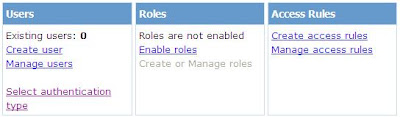
 משפחת פקדים
login
שמגיע מוכן עם
.NET 3.5
משתמשים בכל זה באופן ישיר. ומהקוד שלך, תוכל בקלות לבדוק האם המשתמש הנוכחי נכנס למערכת רשמי כמשתמש מוכר ופרטים נוספים מהסטטוס ה"חברתי" שלו.
מה בזה לא טוב לנו?
משפחת הפקדים הזו מבוססת על הכלת מסד הנתונים המוסתרת שם בדיוק בתוך שכבת הממשק משתמש, גבר שמונע ממך למשוך נתוני משתמש ממסד הנתונים שלך. בנוסף, זה שובר את מודל ה3 שכבות. סה"כ, לא בתוכניות המקוריות שלנו.
אפשר לתת לספק החברות (מחלקה שמנהלת חברות) מאיפה למשוך את הנתונים... אבל אז אתה משנה את ההגדרות לספק החברות שנמצאות ב
machine.config
ע"י הוספת עצמים ל
web.config
ואז מבנה הטבלאות שלך חייב להתאים לדרישות של ספק החברות המוכן. ויתר על כן, מסד הנתונים שלך חייב להימצא בשכבת ממשק המשתמש. עדיין לא 3 שכבות, עדיין לא מצא חן בעינינו.
במחיר הרבה עבודה מיותרת, נוכל לממש ספק חברות משלנו וגם (הודו לה') לשמור על מבנה ה3 שכבות וגם להשתמש בפקדים המוכנים. זה מוצא חן בעינינו, בגלל שלבסוף רוב הקוד שאנחנו כותבות לספק חברות שלנו מהווה פונקציונליות נחוץ כדי ליצור אתר אינטרנט עם זיהוי משתמשים מספקת. ולאור חוסר נסיון שלנו בזיהוי משתמשים, נשמח לקבל הגדרות קשיחות ממיקרוסופט.
נקודה אחרונה: פקדים ממשפחת
login
שוברות את
MVC.
אבל המטרה של דגם תכנון הוא להיות כלי, לא להיות מחסום - אז אם צריך, נשבור!
--------------------------------------------
The time has come to produce a version of the UI. For a web application like ours, we must answer the question: how do we handle user authentication (eg, registration and login) ?
ASP.net is designed to deal with these issues with what it calls "membership".
If the programmer is really lazy (this can be a good thing), ASP.net will generate an invisible database called aspnetdb.mdf in your App_Data folder and invisibly call on a class to persist to that database. A (local) web page that opens directly from the menu in Visual Studio allows you to manage the users from this database at design time.
The Login family of controls provided by ASP.net plug directly into this system. And from your code, you can easily check if the current user is logged in and other details of his "membership" status.
What about this don't we want?
The Login family of controls provided by ASP.net are based on inclusion of the (invisible) database right there in your UI layer, which means that user data is not coming from your own database. Additionally, this is not in keeping with the 3-layered look. Altogether, not part of our original plans. You can tell the membership provider where its database is... but then you're overriding the default provider datastore defined in machine.config by adding elements to web.config, and then your table structure has to be exactly what the canned membership provider is expecting. And, of course, the membership provider is in the UI, so your database must be there, too. Still not 3 layers, still pretty evil.
For the price of lots of extra work, we can implement our own membership provider class and (oh, joy) still preserve the 3 layers AND use Microsoft's Login controls. This is good, because ultimately the vast majority of the code we're writing for our customized membership provider is functionality we need in order to have a website with sufficient authentication. And, as we have little to no experience with authentication, if Microsoft is dictating what our authentication class needs to support, we're more likely to reach our destination.
A final point: the Login controls will never work with MVC. But MVC is a tool for us, not a prison - so when it serves us to break it, we will!
ASP.net
אמור לטפל בנושאים כאלה עם מה שנקרא "חברות" (תרגום
.(membership
אם המתכנת הוא אצלן (זה בעצם יכול להיות דבר טוב) אז סביבת הפיתוח יכול להפיק לו מסד נתונים מוסתר בשם
aspnetdb.mdf
בתיקיית ה
App_Data,
ודרך קריאות למחלקה מוסתרת שומרת נתונים לתוכו. דף לוקלי פותחים ישיר מהתפריט של סביבת הפיתוח שנותן לנהל את המשתמשים המוכרים כבר בזמן תכנון.


 משפחת פקדים
login
שמגיע מוכן עם
.NET 3.5
משתמשים בכל זה באופן ישיר. ומהקוד שלך, תוכל בקלות לבדוק האם המשתמש הנוכחי נכנס למערכת רשמי כמשתמש מוכר ופרטים נוספים מהסטטוס ה"חברתי" שלו.
מה בזה לא טוב לנו?
משפחת הפקדים הזו מבוססת על הכלת מסד הנתונים המוסתרת שם בדיוק בתוך שכבת הממשק משתמש, גבר שמונע ממך למשוך נתוני משתמש ממסד הנתונים שלך. בנוסף, זה שובר את מודל ה3 שכבות. סה"כ, לא בתוכניות המקוריות שלנו.
אפשר לתת לספק החברות (מחלקה שמנהלת חברות) מאיפה למשוך את הנתונים... אבל אז אתה משנה את ההגדרות לספק החברות שנמצאות ב
machine.config
ע"י הוספת עצמים ל
web.config
ואז מבנה הטבלאות שלך חייב להתאים לדרישות של ספק החברות המוכן. ויתר על כן, מסד הנתונים שלך חייב להימצא בשכבת ממשק המשתמש. עדיין לא 3 שכבות, עדיין לא מצא חן בעינינו.
במחיר הרבה עבודה מיותרת, נוכל לממש ספק חברות משלנו וגם (הודו לה') לשמור על מבנה ה3 שכבות וגם להשתמש בפקדים המוכנים. זה מוצא חן בעינינו, בגלל שלבסוף רוב הקוד שאנחנו כותבות לספק חברות שלנו מהווה פונקציונליות נחוץ כדי ליצור אתר אינטרנט עם זיהוי משתמשים מספקת. ולאור חוסר נסיון שלנו בזיהוי משתמשים, נשמח לקבל הגדרות קשיחות ממיקרוסופט.
נקודה אחרונה: פקדים ממשפחת
login
שוברות את
MVC.
אבל המטרה של דגם תכנון הוא להיות כלי, לא להיות מחסום - אז אם צריך, נשבור!
--------------------------------------------
The time has come to produce a version of the UI. For a web application like ours, we must answer the question: how do we handle user authentication (eg, registration and login) ?
ASP.net is designed to deal with these issues with what it calls "membership".
If the programmer is really lazy (this can be a good thing), ASP.net will generate an invisible database called aspnetdb.mdf in your App_Data folder and invisibly call on a class to persist to that database. A (local) web page that opens directly from the menu in Visual Studio allows you to manage the users from this database at design time.
The Login family of controls provided by ASP.net plug directly into this system. And from your code, you can easily check if the current user is logged in and other details of his "membership" status.What about this don't we want?
The Login family of controls provided by ASP.net are based on inclusion of the (invisible) database right there in your UI layer, which means that user data is not coming from your own database. Additionally, this is not in keeping with the 3-layered look. Altogether, not part of our original plans. You can tell the membership provider where its database is... but then you're overriding the default provider datastore defined in machine.config by adding elements to web.config, and then your table structure has to be exactly what the canned membership provider is expecting. And, of course, the membership provider is in the UI, so your database must be there, too. Still not 3 layers, still pretty evil.
For the price of lots of extra work, we can implement our own membership provider class and (oh, joy) still preserve the 3 layers AND use Microsoft's Login controls. This is good, because ultimately the vast majority of the code we're writing for our customized membership provider is functionality we need in order to have a website with sufficient authentication. And, as we have little to no experience with authentication, if Microsoft is dictating what our authentication class needs to support, we're more likely to reach our destination.
A final point: the Login controls will never work with MVC. But MVC is a tool for us, not a prison - so when it serves us to break it, we will!
Subscribe to:
Posts (Atom)
